A Clean Boot is a method of starting Microsoft Windows in Normal Mode (as opposed to Safe Mode) with the minimum of drivers, startup programs and services.
A Clean Boot is one method that can be used in diagnosing Windows startup problems, especially in cases where there is a software conflict or driver problem.
Note: If Windows will not boot into Normal Mode, this Clean Boot procedure can be performed in Safe Mode, as an aid to getting the computer working again in Normal Mode.
To perform a Clean Boot, we need to run theMicrosoft Windows built in utility called MSCONFIG. To do this,
– on Windows XP – Click Start, then click Run. Type msconfig in the text box then click OK.
– on Windows Vista and Windows 7 – Click Start. In the text box where is says ‘Search programs and files’ type msconfig and hit Enter.
When MSCONFIG starts up, it will open a new dialog box with several tabs along the top.
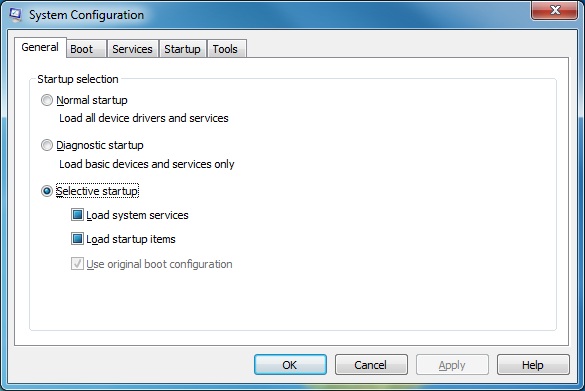
Step 1 – Disable all non-essential Services
Click the Services tab within MSCONFIG.
Make sure the checkbox at the bottom of the dialog box labelled ‘Hide all Microsoft services’ is ticked. Doing this makes sure that you do not accidentally disable a critical Microsoft service required for running Windows.
In the list of services that are left, after hiding the Microsoft ones, untick all remaining services.
Step 2 – Disable Startup programs
Click the Startup tab in MSCONFIG.
Untick all of the startup programs.
Then click OK and restart the computer.
When the compuer restarts, only the essential Microsoft services will run. No 3rd party services or drivers will run at startup, and no 3rd party startup programs will be launched. This is a Clean Boot.
If this process allows the computer to boot up without any problems, you can go back into MSCONFIG and start an iterative process of re-enabling services and startup programs and restarting the computer, until you find the service or startup item that causes the problem to reoccur.
Once you have identified the problem software, you can take the necessary corrective action to fix or remove it.
How to fix your computer if you have gone too far with MSCONFIG
If you disable too many services or startup programs, and especially if you disable any of the Microsoft services, there is a chance that your computer will fail to boot into Windows correctly.
To fix this, you will need to run MSCONFIG again and re-enable services or startup items.
But if you can’t get into Windows normally, what do you do?
The key to fixing this is to boot into Windows Safe Mode first. Fortunately, with all the different versions of Windows, the way to boot into Safe Mode hasn’t changed. So here is a method which should work for all version of Windows.
Start your computer and press F8 repeatedly the instant that the initial PC boot screen disappears, and before the Windows logo appears on the screen.
Doing this will display a basic black and white menu, like the one below.
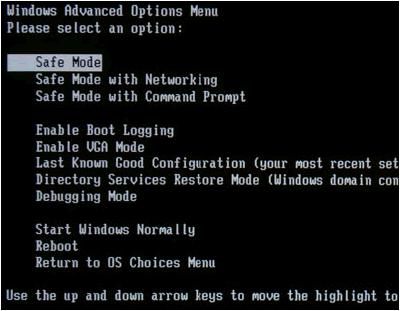
Depending on your version of Windows there might be more or fewer options listed, but Safe Mode will always be one of them.
Select ‘Safe Mode’ and press Enter. Windows will boot into Safe Mode which is a cut down, no frills version of your Windows operating system.
This will let you run MSCONFIG and re-enable anything that has broken the normal version of Windows.
I disabled all startup programs… I’ve tried everything including advanced options but for every option I need to sign in to my profile. One of the programs disabled has to do with the password but nearly every option is useless without that program. On windows 10 btw
Cannot access msconfig from safe mode. No,”advanceced options” available and no recovery disk. I’m using 64 bit, Windows 7, Toshiba Satellite L505. …Same issue. I disabled all in msconfig. That’s not unusualbfor me, though. What was different is disabling all after deleting the 90 PUM objects that Roguekiller found, then restarting. After that starup was so much slower than usual, I checked msconfig which usually has only Avast! And Cleaner checked. A whole list was checked to run at startup. Usually, when I stop all of them, Avast remains on.. Not this time. Now I have the Black Screen and a cursor after choosing normal or safe mode.
I accidentally disabled all start up applications and now my laptop doesnt turn on. I have the charger plugged in and the light is blue but it doesn’t show its charging. Nothing happens when I try to turn it on. Help please!
It sounds like you will need to use System Restore.
Since you cannot boot into Windows or Safe Mode, you will need to access System Restore from the Windows boot options (the menu where you can select Safe Mode).
There may be an option for Advanced Options and System Restore should be one of those options.
Alternatively you could boot from a Windows 8 DVD and select Repair Your Computer, and follow the options for System Restore.
Good luck.
Help me..
I disable all non-micosoft services, and restart
login is ok, till I found a black screen with popup cursor, whanver I move my cursor, I will see my cursor moving but background is black.. I believe this happen when I disable all service in msconfig
I try to load on safe mode, no help at all… pretty much all the same, black screen with safe mode text above and my cursor..
I try several option including.. safemode with cmd, with networking, debug.. etc.. nothing is help
I am really regret disable all services only to play some game that require to disable service to troubleshoot but endedup in disaster
I also believe, my pc are not crash, or missing file occur but in fact due to the services that I disable it all
Now.. I had no idea how to get back to msconfig and enable back the services.. help me, how can I reach the msconfig.. is there any boot rescue that I can access msconfig?
OS : windows 8.1 64 bit
Just got my first Windows 8 box. I used “msconfig” trying to speed up the boot process and now it starts from scratch every time and will not go to the normal desktop. It displays a large white “Start” button (that does nothing) on a purple screen with a swizzle design at the bottom. I can not get to the internet either.
Help
Try booting into Safe Mode (press F8 repeatedly as soon as the BIOS splash screen disappears, and when a black screen appears select Safe Mode).
When it boots into Safe Mode you should be able to run MSCONFIG again and re-enable everything. Reboot normally and you should be back to normal running.